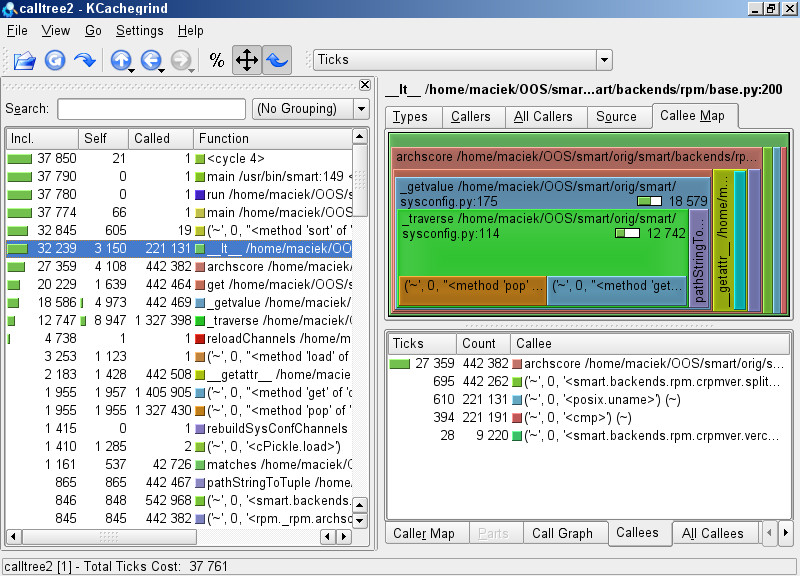
Result of running 'smart query' with profiler
In this article I wanted to describe my work in optimizing Smart under opensuse 10.2 Linux distribution. It is a great package manager but has some performace bottlenecks in its GUI.
Usually, just after starting graphical interface of Smart I open search bar. Unfortunately in my config it took over ten seconds for the program to let me write a query.
My config was a 2 GHz CPU, 2 GB RAM laptop. I had almost 17000 packages in 19 channels, including system RPM database (about 1000) and my local RPM build dir.
For this work used smart-0.51-34.1 from suse smart repository and (in later part of the article) trunk@880 from smart SVN repository .
I already had some version of Smart installed on my system so I had to tell python (because it's written in Python) to use files from my working copy instead of those from /usr/bin/python/site-packages. To achieve this I used this command:
PYTHONPATH=/home/maciek/OOS/smart/working:$PYTHONPATH `which smart` <smart options>
This is very similar to LD_PRELOAD or Java CLASSPATH trick. It justs overrides some files that Python seeks in it's installation folder. /home/maciek/OOS/smart/working is a directory containing a 'smart' folder with all smart object files.
As a profiler I used Python standard cProfile module. It's output was then converted using lsprofcalltree.py script to cachegrind/calltree format and opened it with kcachegrind. It was very helpful in visualising bottlenecks. This is the exact command I used was:
PYTHONPATH=/home/maciek/OOS/smart/working:$PYTHONPATH lsprofcalltree.py -o /tmp/calltree `which smart` <smart options>; kcachegrind /tmp/calltree
Another useful tool was bash built-in time command called like this:
time (PYTHONPATH=/home/maciek/OOS/smart/working:$PYTHONPATH `which smart` <smart options> )
Another thing worth noting is that Python does precompilation to byte-code after each change in code. So when profiling programs in this language you should somehow force full pre-compilation or run it one time before analyzing.
As I said before Smart it was written in Python. It already had many optimizations included.
One of them is a cache which contains most of program objects in serialized form. It includes information about channels, packages and other variable things. This spares parsing channel information and querying RPM database at every program start.
Another interesting technique is using Psyco. It's compiles Python to machine code at startup with some optimizations. Moreover some critical parts (like mentioned cache) of program are rewritten in C and compiled statically into .so file.
Now let's return to Smart startup. From user's point of view, first it loads a cache, updates it if necessary, and after a strange few-second delay shows a package list. At least it did so in my version. Very similar behaviour could be observed in command line UI. Good test case is calling 'smart query' command which just lists all known packages.
My first test was running simple query without GUI but with profiler.
|
|
|
Result of running 'smart query' with profiler |
The first suspect is __lt__ function from smart/backends/rpm/base.py file. In Python this is a comparison operator used ie. during sorting. This is its definition:
class RPMPackage(Package):
(...)
    def __lt__(self, other):
        rc = cmp(self.name, other.name)
        if type(other) is RPMPackage:
            selfver, selfarch = splitarch(self.version)
            otherver, otherarch = splitarch(other.version)
            if archscore(selfarch) == 0:
                return True
            if archscore(otherarch) == 0:
                return False
            if os.uname()[4] == 'x86_64':
                if selfarch != 'x86_64' and otherarch != 'x86_64':
                    pass
                else:
                    if selfarch != 'x86_64':
                        return True
                    if otherarch != 'x86_64':
                        return False

            if rc == 0 and self.version != other.version:
                if selfver != otherver:
                    rc = vercmp(self.version, other.version)
                if rc == 0:
                    rc = -cmp(archscore(selfarch), archscore(otherarch))
        return rc == -1
As we see there is no call to function __getattr__ as in screenshot above. This is an effect of Psyco job. Luckily smart has an option to run it without JIT-compilation: '-o psyco=0'
|
|
|
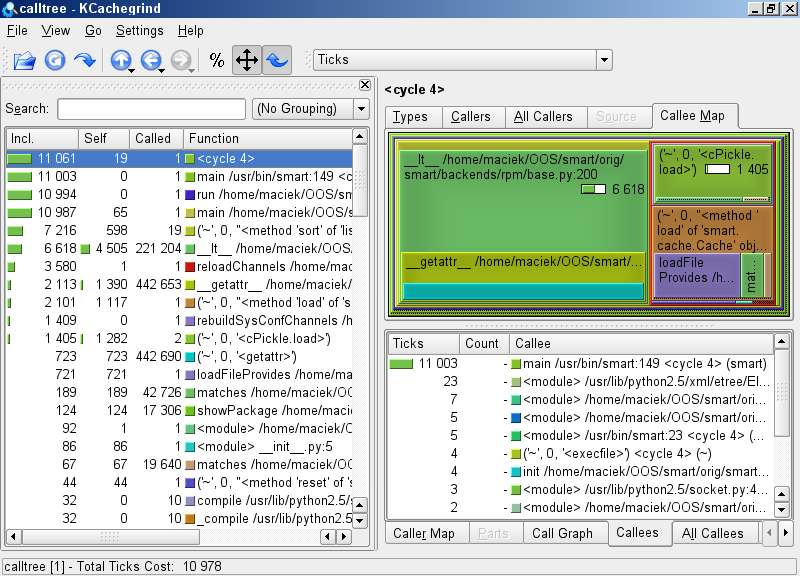
Result of running 'smart query' with profiler but without Psyco optimization |
The ticks in these results are miliseconds. Do you see a more than three time slowdown? Psyco does its job well. It is now also clearly visible that archscore function is guilty. It is called more than twice per comparison!
According to RPM documentation package archscore is a relation between system architecture and package architecture so it can't change during program runtime. We don't have to recount it more than once. Moreover the result depends only on package's arch not on package itself.
So my first optimization was to precompute as much as possible and save the resuts in fields of RPMPackage class. The precomputation must have be done in construction but also in deserialization method (__setstate__). The latter because at this stage I didn't want to break compatibility of cache across different versions of Smart. I also added memoizing results of archscore function. Modified code looked like this:
system_is_x86_64 = os.uname()[4] == 'x86_64'
archscores = {}
def archscore(arch):
    if not arch in archscores:
        (...)
        Normal computation of function, but saving result in archscores[arch]
        (...)
    return archscores[arch]

class RPMPackage(Package):
(...)
    def __init__(self, name, version):
        Package.__init__(self, name, version)
        self.ver, arch = splitarch(self.version)
        self.archscore = archscore(arch)
        self.arch_is_not_x86_64 = arch != 'x86_64'

    def __setstate__(self, state):
        Package.__setstate__(self, state)
        self.ver, arch = splitarch(self.version)
        self.archscore = archscore(arch)
        self.arch_is_not_x86_64 = arch != 'x86_64'

    def __getstate__(self):
        state = Package.__getstate__(self)
        return state

    def __lt__(self, other):
        rc = cmp(self.name, other.name)
        if type(other) is RPMPackage:
            if self.archscore == 0:
                return True
            if other.archscore == 0:
                return False
            if system_is_x86_64:
                if self.arch_is_not_x86_64 and other.arch_is_not_x86_64:
                    pass
                else:
                    if self.arch_is_not_x86_64:
                        return True
                    if other.arch_is_not_x86_64:
                        return False

            if rc == 0 and self.version != other.version:
                if self.ver != other.ver:
                    rc = vercmp(self.version, other.version)
                if rc == 0:
                    rc = -cmp(self.archscore, other.archscore)
        return rc == -1
Comparison of mean run times of both versions, as I anticipated, was very promising:
Original version: 0m7.34s
Modified version: 0m3.91s
At that moment I was so happy with my modification that I wanted to publish it and end this work.
I downloaded SRC.RPM and realized that my patch doesn't apply at all to a stock smart 0.51. What saddened me was that this version was even slightly faster than one modifed by me.
Quick look through opensuse specific patches was enough to find one that crippled performace. It was smart-better-x86_64-support.patch. There was also another one, smart-fix-archscore-add-disable-biarch-option.patch, which modifed archscore function. So I just updated them with my modifications.
When testing difference in GUI speed I noticed another problem. After starting a program, if I opened search bar quickly enough, whole application froze for a few seconds. Every version behaved like that. It was annoying because everything I thought it should do was to show the bar and clear the list of packages.
Using my favourite kcachegrind I found this fragment of code in smart/interfaces/interactive.py file:
class GtkInteractiveInterface(GtkInterface):
    (...)
    def setBusy(self, flag):
        if flag:
            self._window.window.set_cursor(self._watch)
            while gtk.events_pending():
                gtk.main_iteration()
        else:
            self._window.window.set_cursor(None)
    (...)
    def toggleSearch(self):
        visible = not self._searchbar.get_property('visible')
        self._searchbar.set_property('visible', visible)
        self.refreshPackages()
        if visible:
            self._searchentry.grab_focus()

    def refreshPackages(self):
        (...)
        self.setBusy(True)
        (...)
        much time consuming operations concerning searching data in packages information
        (...)
        self.setBusy(False)
|
|
|
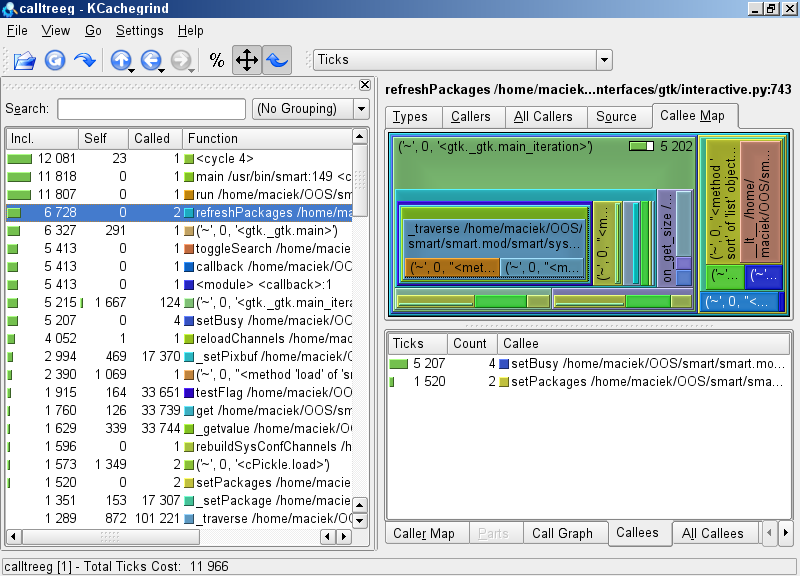
Result of running 'smart --gui', opening search bar and exiting |
Here we clearly see that setBusy lasted very long during executiion of GTK main loop. I further investigated that this loop ran _setPixbuf method at least once for every package. This method updates icon next to package name.
To correct user experience I had two options:
- optimize _setPixBuf function (it was limited by PkgConfig.testFlag)
- somehow make it compute in background
If I hadn't opened the search bar it'd take place in background. I thought I'd be nice to postpone it to the moment when user entered his query. I tried of course to remove call to main_iteration in setBusy but it resulted in not showing an hourglass at all during package search.
Finally I changed the whole loop to single, non-blocking GTK iteration:
    def setBusy(self, flag):
        if flag:
            self._window.window.set_cursor(self._watch)
        else:
            self._window.window.set_cursor(None)
        gtk.main_iteration_do(False)
As a result cursor is correctly altered and setBusy no longer blocks refreshPackages operation.
The two modifications greatly increased comfort of using Smart package manager for me. What now is most disturbing is time needed to load and update cache, but I'm not sure if there is much more to do in this matter.
Updated suse patches: smart-fix-archscore-add-disable-biarch-option.patch , smart-better-x86_64-support.patch
GUI patch: smart-setBusy-dont-run-gtk-mainloop.patch
Smart homepage: http://labix.org/smart